

Key Takeaways
Internet Connection Types
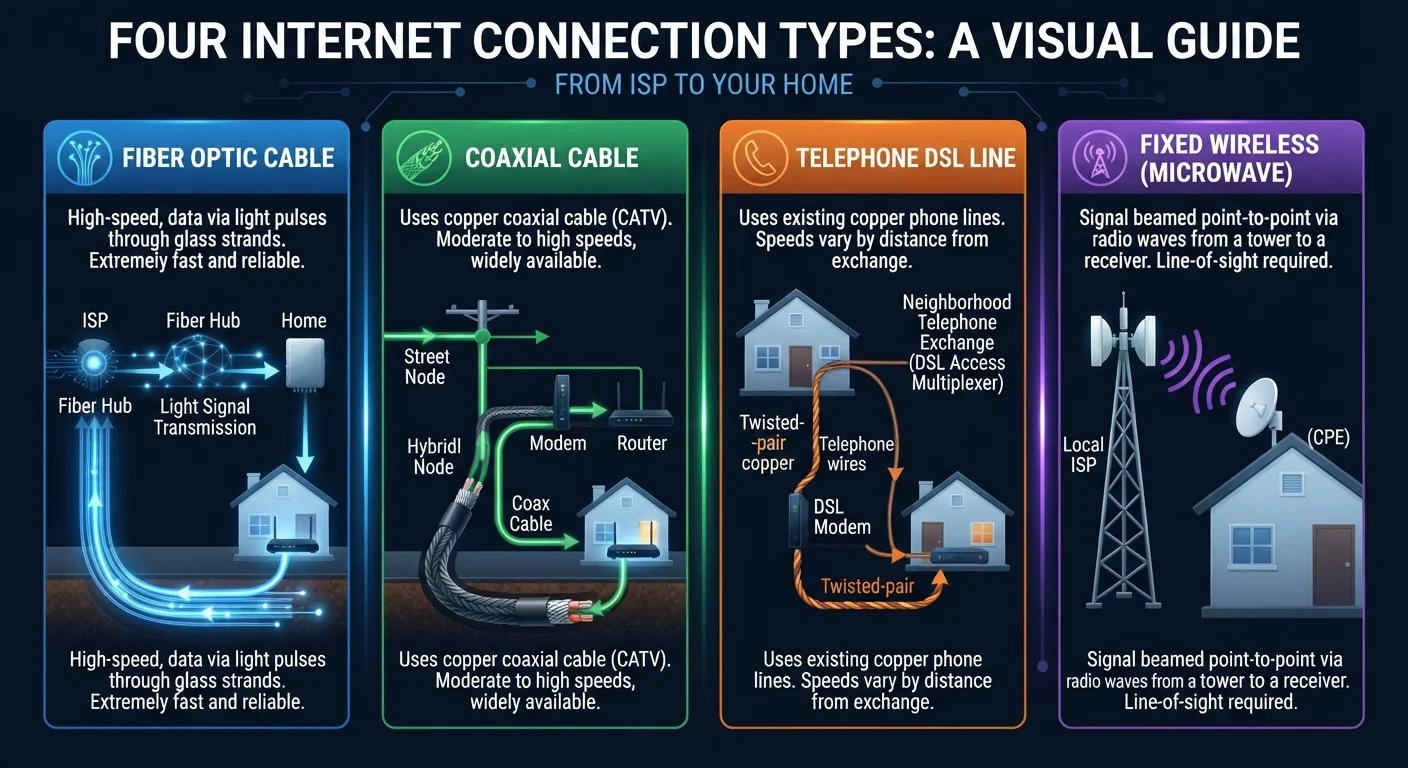
Internet connection types refer to the physical or wireless technology used to deliver broadband service to your home. Fiber uses glass strands carrying light signals, cable uses coaxial TV lines, DSL uses copper phone lines, and fixed wireless sends signals through the air from a nearby tower. Each technology has distinct speed ceilings, reliability characteristics, and geographic availability.
The underlying transmission medium determines not just maximum throughput but also latency, symmetry of upload/download speeds, and susceptibility to congestion - factors that matter as much as advertised speeds in everyday use.
Fiber Internet: The Gold Standard - Where Available
Fiber-optic internet transmits data as pulses of light through thin glass or plastic strands. Because light doesn't degrade the way electrical signals do over distance, fiber maintains consistent speeds regardless of how far your home sits from the provider's equipment.
The defining advantage is symmetrical bandwidth - upload speeds match download speeds. That matters for video conferencing, cloud backups, and remote work. Most fiber plans offer 300 Mbps, 500 Mbps, or 1 Gbps tiers, and multi-gig plans are increasingly available in deployed markets.
The catch is availability. Fiber requires providers to run entirely new physical infrastructure, a capital-intensive process that has prioritized dense urban and suburban markets. The FCC's broadband data shows fiber reaching roughly 40-45% of U.S. locations as of recent reporting cycles, with expansion ongoing through federal funding programs. See how fiber and cable differ beyond speed for a closer look at the technical trade-offs.
Cable Internet: Widespread but Shared
Cable internet travels over the same coaxial lines originally built for cable television. It's the most widely available high-speed option in suburban America, reaching a large majority of U.S. households.
Download speeds are genuinely competitive - many cable plans advertise 200 Mbps to 1 Gbps. The structural limitation is that coaxial networks are shared infrastructure: subscribers in the same node share available bandwidth. During evenings and weekends, real-world speeds can fall below the advertised maximum. Understanding shared vs. dedicated connections explains how this architecture affects everyday performance.
Upload speeds have historically been cable's weakest point. Traditional DOCSIS 3.0 deployments cap uploads well below downloads. The industry is deploying DOCSIS 3.1 and DOCSIS 4.0 technology to improve upload capacity, but rollouts are uneven across providers and markets.
~45%
U.S. locations with fiber access
Based on FCC Broadband Data Collection reporting; fiber deployment is ongoing with federal funding accelerating expansion in underserved areas.
~90%
U.S. households with cable broadband available
Cable's coaxial infrastructure, built out for TV service, gives it the broadest footprint among wired technologies in suburban and urban America.
25 Mbps / 3 Mbps
FCC's minimum broadband definition (legacy)
The FCC updated its broadband benchmark to 100 Mbps download / 20 Mbps upload in 2024 to better reflect modern usage - a threshold many DSL connections cannot meet.
DSL: The Phone-Line Holdover
Digital Subscriber Line (DSL) internet runs over copper telephone wiring already installed in most American homes. Because no new lines need to be laid, DSL reached rural and suburban areas long before cable or fiber arrived - and it remains a primary option for millions of households.
Speed is directly tied to distance: the farther your home from the provider's central office or remote terminal, the slower the connection. Close-in subscribers may see 50-100 Mbps on newer VDSL2 equipment. Customers several miles out may receive 5-15 Mbps - functional for light use but strained by simultaneous 4K streaming or large file uploads.
DSL also delivers asymmetric speeds, with uploads significantly slower than downloads. For households in areas without cable or fiber, comparing fixed wireless against DSL can help clarify which technology better fits the situation.
Fixed Wireless: Bridging the Rural Gap
Fixed wireless internet uses a radio antenna mounted on your home or rooftop to receive a signal from a nearby cellular or dedicated wireless tower - typically within 10 miles. No physical cable runs to the home, making it deployable in areas where trenching fiber or extending cable lines is economically impractical.
Modern fixed wireless access (FWA), especially on 5G or advanced LTE networks, can deliver download speeds of 25-300 Mbps depending on tower proximity, spectrum bands used, and subscriber density on the tower. Latency is generally lower than satellite internet but higher than fiber.
Performance variables include line-of-sight obstructions (hills, dense trees, buildings) and weather. Heavy rain or wet foliage can attenuate signals on higher frequency bands. Capacity is also shared among tower subscribers, which can cause congestion in areas with high fixed wireless adoption.
Check Coverage Before You Commit
Provider coverage maps are legally required to be more accurate than in previous years following FCC reporting reforms, but errors still exist. Enter your specific address - not just your ZIP code - into the FCC Broadband Map (broadbandmap.fcc.gov) and cross-reference with your state's broadband office to get the most reliable picture of what's actually available at your location.
For a fuller picture of all your options before committing to a plan, the key questions to ask before choosing a home internet plan can help you evaluate what each provider is actually offering at your address.
Choosing Based on What's Actually Available
Most households don't choose their connection type freely - they choose among whatever technologies reach their address. Urban residents often have fiber and cable. Suburban households commonly have cable and sometimes fiber. Rural addresses may be limited to DSL, fixed wireless, or satellite.
Before comparing plan pricing or speed tiers, confirm which technologies are physically present at your location. Advertised service maps from providers frequently overstate coverage; the FCC's Broadband Map and your state broadband office offer more address-specific data.
Once you know your options, matching the technology to your household's actual usage is the next step. Understanding what speeds your household actually needs can prevent overpaying for capacity you won't use - or under-buying for a home with heavy simultaneous demand. And if you're new to the whole process, a plain-language primer on home internet covers the fundamentals from the ground up.
A household in a dense suburb streams 4K video on multiple TVs while one adult works from home on video calls.
A family in a small rural town 4 miles from the nearest phone company central office relies on DSL.
A remote farmhouse on hilly terrain signs up for fixed wireless internet from a local provider.
An apartment resident in a mid-sized city has access to both cable and a newly built fiber network.