

Key Takeaways
Shared vs. Dedicated Internet
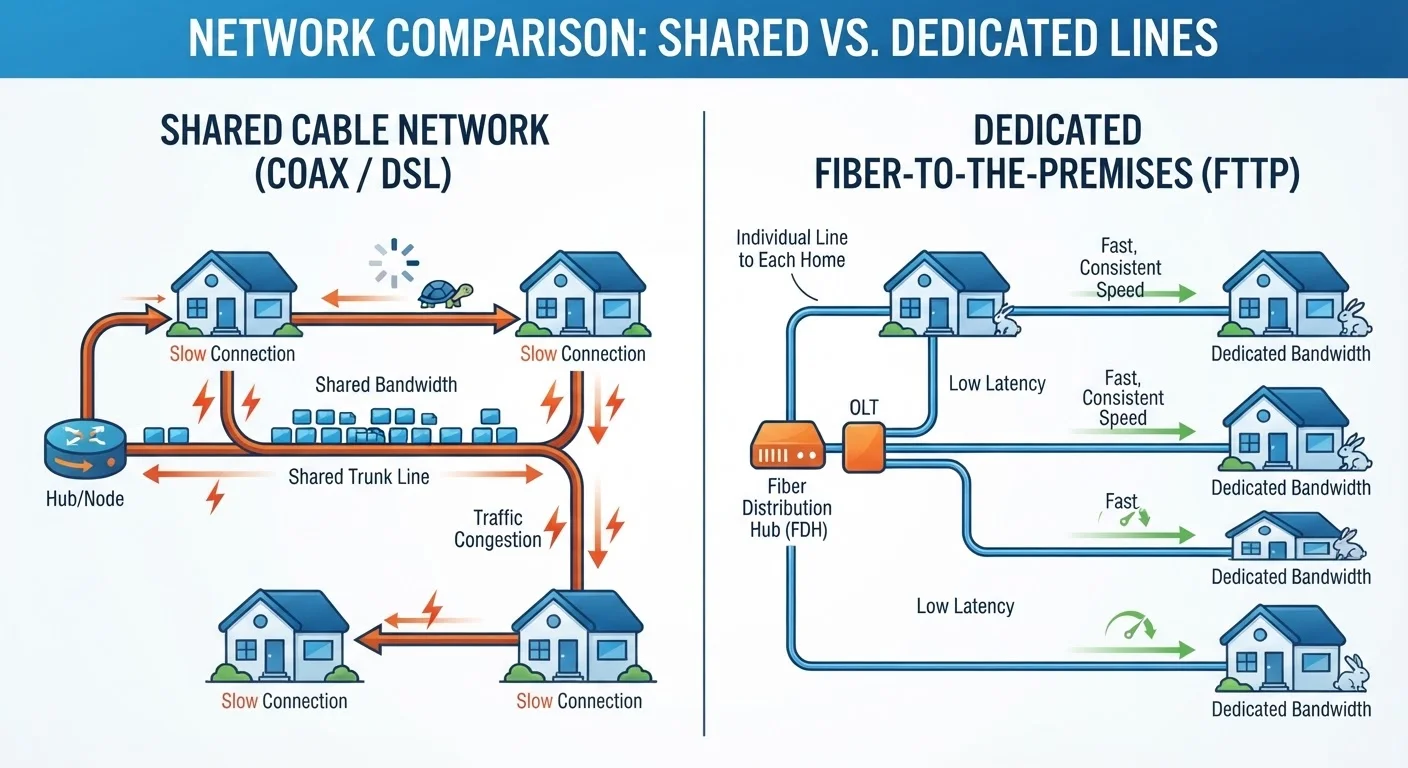
A shared internet connection means your neighborhood's bandwidth is split among multiple households using the same physical infrastructure at the same time. A dedicated connection gives your home its own direct path to the network, so your speeds aren't affected by what your neighbors are doing. The distinction matters most during peak usage windows - evenings and weekends - when shared networks experience the most congestion.
In cable networks, the coaxial segment connecting homes to a neighborhood node is a shared medium using DOCSIS protocols; fiber-to-the-home (FTTH) architectures typically provision individual wavelengths or dedicated strands per subscriber.
How Shared Networks Actually Work
When a cable internet provider runs service to a neighborhood, they typically connect dozens - sometimes hundreds - of homes to the same coaxial cable segment, which feeds into a neighborhood node. That node has a fixed amount of bandwidth capacity, and every household on the segment draws from the same pool.
Think of it like a water main serving a street: when everyone turns on their taps at once, pressure drops for everyone. On a cable network, that "pressure drop" appears as slower speeds, higher latency, and buffering during peak hours - typically weekday evenings and weekend afternoons when residents are home and online simultaneously.
This architecture is a deliberate engineering trade-off. Shared infrastructure is significantly cheaper to build and maintain, which is part of why cable internet reached broad coverage across the U.S. well before fiber. The cost savings get passed along, but so does the congestion risk.
~15-20%
Typical cable speed drop during peak hours
FCC Measuring Broadband America reports have found that some cable providers deliver noticeably lower speeds during peak evening periods compared to off-peak measurements.
~3-5%
Typical fiber speed variation at peak times
FCC data has generally shown fiber-to-the-home providers deliver speeds much closer to advertised tiers during peak hours, reflecting the benefits of dedicated architecture.
~50%
U.S. homes with access to fiber broadband
According to FCC broadband availability data, roughly half of U.S. housing units have at least one fiber provider available, though actual deployment varies significantly by region.
What Makes a Dedicated Connection Different
A dedicated connection means your home has its own direct path to the provider's network - bandwidth isn't split with neighbors at the local infrastructure level. Fiber-to-the-home (FTTH) is the most common example. Each subscriber typically gets an individual fiber strand or wavelength running from their home to a local optical distribution point, which the provider manages separately for each customer.
The practical result is that your speeds are far less dependent on what the family next door is doing at 8 p.m. on a Tuesday. You're much more likely to get speeds close to your subscribed tier when it actually counts. This consistency is one of the most meaningful real-world advantages of fiber infrastructure - and it's often overlooked when people compare plans based solely on advertised speed numbers. See our deeper look at fiber vs. cable differences for more on how these technologies diverge beyond raw speed.
Test Speeds at Different Times of Day
Run a speed test at noon on a weekday and again at 8 p.m. on a weeknight. A significant gap between the two results is a strong indicator that you're on a shared network experiencing congestion. Many free speed test tools allow you to log results over time, making it easier to document a pattern.
Where Other Technologies Fall on the Spectrum
Cable and fiber aren't the only options, and the shared-versus-dedicated distinction applies to other technologies as well - though in more nuanced ways.
DSL uses a dedicated copper phone line from your home to the provider's central office, so the final segment is technically yours alone. But DSL speeds are heavily influenced by how far you are from that office, and upstream aggregation still introduces shared elements. For a comparison of how DSL stacks up in low-coverage areas, see our article on fixed wireless vs. DSL in rural settings.
Fixed wireless service - where a receiver on your home connects to a nearby tower - shares radio spectrum with other subscribers in the coverage area. The degree of congestion depends on how many users a given tower serves and how much capacity the provider has provisioned.
Satellite internet shares both satellite transponder capacity and ground station bandwidth, though modern low-Earth-orbit systems have improved throughput compared to older geostationary services.
What Advertised Speeds Are Actually Telling You
Providers advertise speeds as maximums, not guarantees. On a shared network, your plan's listed speed is what you could theoretically receive under ideal, low-congestion conditions - not what you'll reliably experience at peak times. The FCC's Measuring Broadband America program has consistently found that some cable providers deliver meaningfully lower speeds during peak hours compared to off-peak periods, while fiber providers tend to show smaller gaps between their advertised and actual speeds.
Understanding whether your connection is shared or dedicated reframes how you should evaluate speed tiers. A shared 400 Mbps cable plan may deliver slower real-world performance during evenings than a dedicated 200 Mbps fiber plan. Raw headline numbers don't tell the full story. For guidance on matching speed tiers to actual household needs, our article on what internet speed you actually need breaks it down by use case.
Upload capacity is another area where the shared model shows its limits. Cable networks allocate proportionally less upstream bandwidth than downstream, and that limited upload capacity is also shared. This matters more than ever for remote workers, content creators, and households relying on video calls. See our breakdown of download vs. upload speed for context on when upload becomes the real bottleneck.
How to Use This Knowledge as a Consumer
Knowing your connection type won't change the infrastructure in your neighborhood, but it sets realistic expectations and sharpens your evaluation process when options exist. If you consistently experience slowdowns during evening hours and your service runs on a shared cable network, that's an architecture problem - not necessarily something a speed tier upgrade alone will fix.
When comparing plans, ask providers directly whether they offer fiber-to-the-home or fiber-to-the-node service - the distinction matters significantly. Check whether fiber has reached your street, since availability can vary block by block even within the same ZIP code. Our explainer on why internet availability varies by street explains the infrastructure factors that drive these gaps.
If dedicated fiber isn't available at your address and you're on a shared cable network, running speed tests at different times of day - peak and off-peak - gives you useful data on how much congestion actually affects your connection. That evidence is also useful if you need to discuss service quality with your provider.